
Integration API
Want to integrate your app or device with our platform? Waypoint, STOPS, SPEED and regularity control, and the integration API.
A. Using WPs in events
How to check STOPs, speed in speed-controlled zones, passage through control WPs, WPs for regularity events and miscellaneous WPs.
1. Checking stops at STOPS
To check that riders make STOPs of at least 1 second at the chosen points, simply add WPs with the following structure to the GPX attached for checking the event.
STOPXThe WP name must be STOP in capitals followed by the STOP number.
Example:
STOP1 , STOP56 , etc.2. Maximum speed control in specific zones
You can check that the rider does not exceed the speed limit in specific zones. As soon as a rider exceeds it, even once, in a section, that section counts as penalised, and the system shows how many speed-control zones were passed or penalised. If, for example, there are 6 speed-controlled zones and the rider speeds in two of them, it would mark 4 of 6 zones as correct.
To check that riders do not exceed the speed limit in specific zones, add WPs with the following structure to the GPX attached for checking the event.
SPEED_XXX_T_NNXXX= Speed. Numeric value, digits 0 to 9; if it has two digits, add a 0 in front.T= Section start or end type. Options (I = start, F = end)N= WP number. Numeric value, digits 0 to 9; if it is a single digit, add a 0 in front.
Example:
SPEED_090_I_01  ( Start of a 90 speed-control section )
SPEED_090_F_01  ( End of a 90 speed-control section )
3. Checking passage through WPs
You can check that the rider passes through the chosen WPs: the system shows which WPs the rider passed and validates them. If, for example, the GPX has 256 WPs and the rider only registered passing 232, the system would mark 232 of 256 as valid.
To do so, simply add WPs with the following structure to the GPX attached for checking the event.
CPXXThe WP name must start with CP in capitals followed by the WP number.
Example:
CP1 , CP34 ,etc4. Checking passage through regularity event WPs
You can check that the rider passes through the chosen WPs at the chosen time: the system shows which WPs the rider passed within the set margin and penalises the time difference.
The system allows a time window in which the rider is not penalised, a penalty for each second late or early, and a penalty for missing the WP
Imagine a WP whose passage time is 1 h 45 min 21 s after the rider's start, with a 20 s grace window.
If the rider passes 1 h 45 min 15 s after their start, the system gives the rider 0 penalty points.
To do so, simply add WPs with the following structure to the GPX attached for checking the event.
CPRXXXXXThe WP name must start with CPR in capitals followed by the number of seconds after their start at which the rider must pass the WP.
XXXXX= seconds. Numeric value, digits 0 to 9; if it is shorter than five digits, pad with 0s in front.
Example:
CPR00034  = Regularity control WP, the rider must pass it 34 seconds after their start
CPR02421 = Regularity control WP, the rider must pass it  2421  seconds after their start
5. Miscellaneous WPs
Informative WPs are shown on the map of the tracking website. To do so, simply add WPs with the following structure to the GPX attached for checking the event.
Any WP name that does not start with the WPs listed above, that is, not starting with SPEED, STOP, CP or CPR.
B. Integration API: sending data to TeamTrack
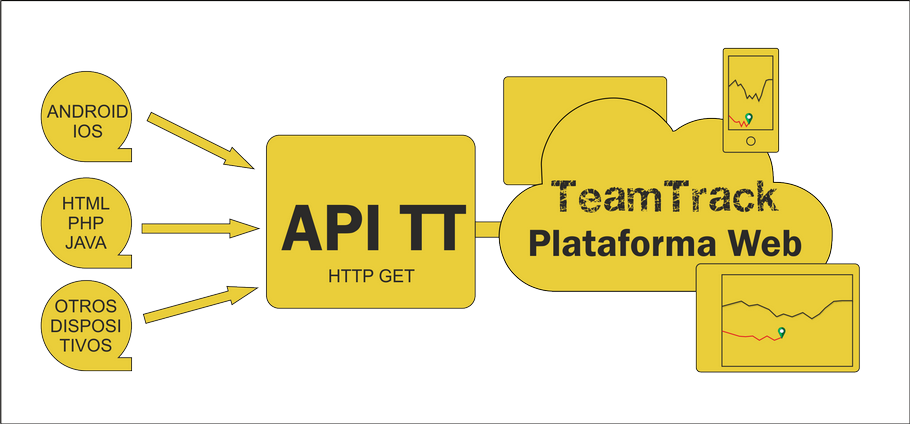
Want to integrate your app or device with our platform?
Ask us for the documentation and we'll explain how to do it easily.
You can send data from your app or device to our platform to place it on our maps, using all our features, free of charge.
It is done with an HTTP GET request with the following structure:
https://www.teamtrackonline.com/gestion/inputs/input.php?lat=latitud&lon=longitud&speed=velocidad&datetime=datetime&altitude=altitud&battery=bateria&usuario_tt=id_usuario_tt&key_api=keyExample values:
latitud : 22.54596 (required)
longitud : 113.94389 (required)
velocidad : 23.56
datetime : 2018/12/04Z08:39:03 (required)
altitud:  128
bateria:  95
id_usuario_tt : 1285 (required)
key_api : TU_KEY_API (required)
By sending the location from your app or device to our platform you can use the TeamTrack tracking websites as usual, as well as the movement history, see the location sent from the TeamTrack app on iOS and Android devices, etc.
Query format:
| Field | Type | Comment |
|---|---|---|
latitud | Double. With a dot as decimal separator | Location latitude. Example: 22.54876. Negative values allowed, e.g. -3.345. Required field. |
longitud | Double. With a dot as decimal separator | Location longitude. Example: 113.54876. Negative values allowed, e.g. -42.845. Required field. |
velocidad | Double. With a dot as decimal separator | User's current speed in km/h. Example: 23.56. If not used, send 0. |
datetime | Datetime. YYYY/MM/DDZHH:MM_SS | Use Z as separator between date and time. Example: 2018/12/04Z08:39:03. Required field. |
altitud | Double. With a dot as decimal separator | User's altitude in metres. Example: 128.32. If not used, send 0. |
bateria | Double. With a dot as decimal separator | Device battery level. Example: 95. If not used, send 0. |
id_usuario_tt | Integer. | TeamTrack user ID number. Example: 1464. Required field. |
puntos_no | Double. With a dot as decimal separator | Naviopen points. Example: 251.12. Negative values allowed. If not used, send 0. |
key_api | varchar, 30 characters | API key provided by TeamTrack that identifies the application sending the data. Required field. |
Responses:
OK– Information receivedError– Error in the attached information. Check the data sent.
C. Integration API: getting data from TeamTrack
Want to take data out of our platform to manage or display it?
Ask us for the documentation and we'll explain how to do it easily.
There are several queries:
1. Querying the data of participants entered in an event
It is done with an HTTP GET request with the following structure:
https://www.teamtrackonline.com/dka/existe.php?action=participants&race_id=race_id&api_key=key_apiExample values:
race_id : 365 (required) – Event ID
key_api :  TU_KEY_API  (required)
Example query:
https://www.teamtrackonline.com/dka/existe.php?action=participants&race_id=365&api_key=TU_KEY_APIWhen you make the query, the system replies with information on the event participants with the following data:
[
{"nombre_usuario":"Piloto 1 ","num_dorsal":"1","ultima_actualizacion":"2021-03-17 09:14:46","lat":"37.425678","lon":"-2.972899","vel":"43.1","alt":"1206.6","bateria":"63 %"},
{"nombre_usuario":"Piloto 2 ","num_dorsal":"2","ultima_actualizacion":"2021-03-17 09:14:36","lat":"37.423009","lon":"-2.970436","vel":"55.4","alt":"1226.5","bateria":"58 %"},
{"nombre_usuario":"Piloto 3 ","num_dorsal":"3","ultima_actualizacion":"2021-03-17 09:14:47","lat":"37.422543","lon":"-2.980097","vel":"28.7","alt":"1182.5","bateria":"96 %"},
{"nombre_usuario":"Piloto 4 ","num_dorsal":"4","ultima_actualizacion":"2021-03-17 09:14:26","lat":"37.434076","lon":"-2.999814","vel":"82.3","alt":"1115.1","bateria":"55 %"},
{"nombre_usuario":"Piloto 5 ","num_dorsal":"5","ultima_actualizacion":"2021-03-17 09:14:45","lat":"37.425076","lon":"-2.994982","vel":"39.1","alt":"1113.0","bateria":"62 %"},
{"nombre_usuario":"Piloto 5 ","num_dorsal":"R","ultima_actualizacion":"2021-03-17 09:14:47","lat":"37.485225","lon":"-3.032848","vel":"27.0","alt":"1000.5","bateria":"100 %"}
]
2. Querying a participant's route over a time interval
It is done with an HTTP GET request with the following structure:
https://www.teamtrackonline.com/dka/existe.php?action=participant_route&race_id=race_id&num_dorsal=num_dorsal&date_time_ini=date_time_ini&date_time_fin=date_time_fin&api_key=key_apiExample values:
race_id : 365 (required) Event ID
num_dorsal : 1 (required) Rider's race number
date_time_ini : 2020/12/04Z08:30:00 (required) Date and time from which the rider's records are shown
date_time_fin : 2020/12/04Z19:30:00 (required) Date and time up to which the rider's records are shown
backup_gps : 1 or 0 (optional) 1 sends the backup beacon's data, 0 sends the main beacon's data; by default the main beacon's data is sent
key_api : TU_KEY_API (required)
Example query:
https://www.teamtrackonline.com/dka/existe.php?action=participant_route&race_id=365&num_dorsal=3&date_time_ini=2021-03-17Z08:04:00&date_time_fin=2021-03-17Z08:04:55&api_key=TU_KEY_APIWhen you make the query, the system replies with information on the event participants with the following data:
[
{"usuario":"3901","lat":"37.294017","lon":"-3.167673","alt":"985.0","vel":"0.2","bearing":"27","GNSS_AC":"1","fecha":"2021-03-17 08:04:01"},
{"usuario":"3901","lat":"37.294017","lon":"-3.167673","alt":"985.0","vel":"0.0","bearing":"27","GNSS_AC":"1","fecha":"2021-03-17 08:04:03"},
{"usuario":"3901","lat":"37.294017","lon":"-3.167673","alt":"985.0","vel":"0.0","bearing":"27","GNSS_AC":"1","fecha":"2021-03-17 08:04:05"},
{"usuario":"3901","lat":"37.294017","lon":"-3.167673","alt":"985.0","vel":"0.0","bearing":"27","GNSS_AC":"1","fecha":"2021-03-17 08:04:07"},
{"usuario":"3901","lat":"37.294017","lon":"-3.167673","alt":"985.0","vel":"0.0","bearing":"27","GNSS_AC":"1","fecha":"2021-03-17 08:04:09"},
{"usuario":"3901","lat":"37.294017","lon":"-3.167673","alt":"985.0","vel":"0.0","bearing":"27","GNSS_AC":"1","fecha":"2021-03-17 08:04:11"},
{"usuario":"3901","lat":"37.294017","lon":"-3.167673","alt":"985.0","vel":"0.0","bearing":"27","GNSS_AC":"1","fecha":"2021-03-17 08:04:13"},
{"usuario":"3901","lat":"37.294017","lon":"-3.167673","alt":"985.0","vel":"0.0","bearing":"27","GNSS_AC":"1","fecha":"2021-03-17 08:04:15"},
{"usuario":"3901","lat":"37.294017","lon":"-3.167673","alt":"985.0","vel":"0.0","bearing":"27","GNSS_AC":"1","fecha":"2021-03-17 08:04:17"},
{"usuario":"3901","lat":"37.294017","lon":"-3.167673","alt":"985.0","vel":"0.0","bearing":"27","GNSS_AC":"1","fecha":"2021-03-17 08:04:19"},
{"usuario":"3901","lat":"37.294017","lon":"-3.167673","alt":"985.0","vel":"0.0","bearing":"27","GNSS_AC":"1","fecha":"2021-03-17 08:04:21"},
{"usuario":"3901","lat":"37.294017","lon":"-3.167673","alt":"985.0","vel":"0.0","bearing":"27","GNSS_AC":"1","fecha":"2021-03-17 08:04:23"},
{"usuario":"3901","lat":"37.294017","lon":"-3.167673","alt":"985.0","vel":"0.0","bearing":"27","GNSS_AC":"1","fecha":"2021-03-17 08:04:25"},
{"usuario":"3901","lat":"37.294017","lon":"-3.167673","alt":"985.0","vel":"0.0","bearing":"27","GNSS_AC":"1","fecha":"2021-03-17 08:04:27"},
{"usuario":"3901","lat":"37.294017","lon":"-3.167673","alt":"985.0","vel":"0.0","bearing":"27","GNSS_AC":"1","fecha":"2021-03-17 08:04:29"},
{"usuario":"3901","lat":"37.294017","lon":"-3.167673","alt":"985.0","vel":"0.0","bearing":"27","GNSS_AC":"1","fecha":"2021-03-17 08:04:31"},
{"usuario":"3901","lat":"37.294017","lon":"-3.167673","alt":"985.0","vel":"0.0","bearing":"27","GNSS_AC":"1","fecha":"2021-03-17 08:04:33"},
{"usuario":"3901","lat":"37.294017","lon":"-3.167673","alt":"985.0","vel":"0.0","bearing":"27","GNSS_AC":"1","fecha":"2021-03-17 08:04:35"},
{"usuario":"3901","lat":"37.294017","lon":"-3.167673","alt":"985.0","vel":"0.0","bearing":"27","GNSS_AC":"1","fecha":"2021-03-17 08:04:37"},
{"usuario":"3901","lat":"37.294017","lon":"-3.167673","alt":"985.0","vel":"0.0","bearing":"27","GNSS_AC":"1","fecha":"2021-03-17 08:04:39"},
{"usuario":"3901","lat":"37.294038","lon":"-3.167659","alt":"985.2","vel":"8.7","bearing":"18","GNSS_AC":"1","fecha":"2021-03-17 08:04:41"},
{"usuario":"3901","lat":"37.294060","lon":"-3.167653","alt":"985.0","vel":"3.4","bearing":"10","GNSS_AC":"1","fecha":"2021-03-17 08:04:43"},
{"usuario":"3901","lat":"37.294066","lon":"-3.167652","alt":"984.6","vel":"0.5","bearing":"10","GNSS_AC":"1","fecha":"2021-03-17 08:04:45"},
{"usuario":"3901","lat":"37.294066","lon":"-3.167652","alt":"984.7","vel":"0.0","bearing":"10","GNSS_AC":"1","fecha":"2021-03-17 08:04:47"},
{"usuario":"3901","lat":"37.294066","lon":"-3.167652","alt":"984.7","vel":"0.0","bearing":"10","GNSS_AC":"1","fecha":"2021-03-17 08:04:49"},
{"usuario":"3901","lat":"37.294066","lon":"-3.167652","alt":"984.7","vel":"0.0","bearing":"10","GNSS_AC":"1","fecha":"2021-03-17 08:04:53"},
{"usuario":"3901","lat":"37.294066","lon":"-3.167652","alt":"984.7","vel":"0.0","bearing":"10","GNSS_AC":"1","fecha":"2021-03-17 08:04:55"}
]
Any questions? Contact us